
Features
What GRADEFLOW sends to Resolve, and what it doesn't. Best to know before you buy.
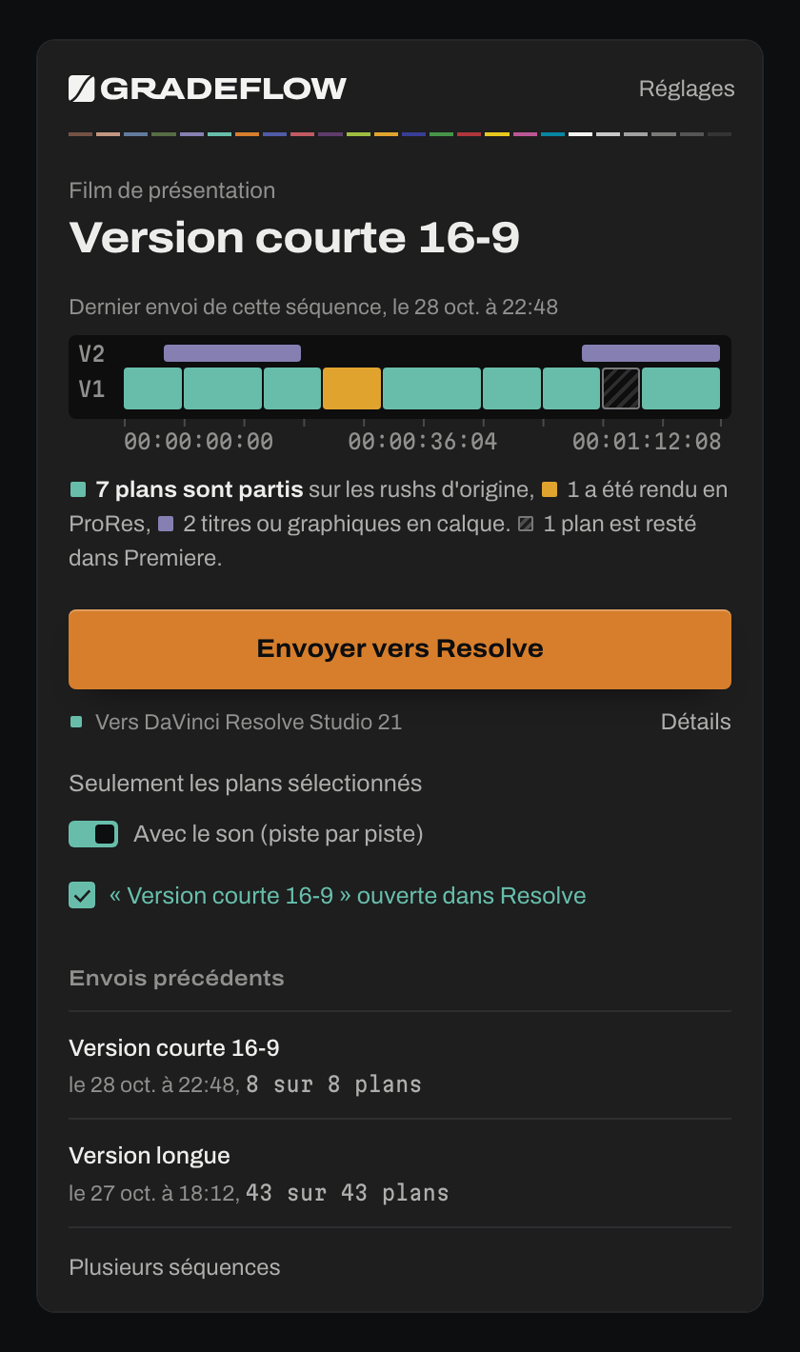
Every clip is sorted before it goes.
Clips Resolve can read as they are link to the original media, uncompressed. The others are rendered by Premiere, clip by clip, with no color conversion.
The image arrives just as you shot it.
GRADEFLOW doesn't touch the image: log footage arrives as log in Resolve, on the original file, uncompressed. Your grade stays yours.
Drag the split, then pull the curve: it's the gesture waiting for you on the Color page.
What goes to Resolve
Clips and their timecodes
The XML points to your files, at the right source timecode, frame rate and drop-frame included. A 50p clip in a 25p sequence, or a 23.976, 29.97 or 59.94 clip in a 25p sequence, lands on the same frame as in Premiere, from the start of the clip to the end.
A clip that was moved or left at an old path is found again by its name and folder. A disconnected drive is named in the report.
Framing
Scale, position, rotation, cropping and flips carry over, including for a 4K clip reframed in a vertical sequence.
An animated motion path arrives with a few keyframes, within a pixel of Premiere: you adjust it in Resolve as if you had made it there.
Speeds and freeze frames
Slow motion, speed-ups, ramps and reverse playback go out on the original media, with the points set in Premiere: the ramp stays editable in Resolve. A freeze frame becomes a Resolve freeze frame.
Titles, logos and subtitles
Simple titles from Essential Graphics become editable Text+ titles. An animated logo keeps its original file and its keyframes. Subtitles arrive as editable text, and their .srt file is put in the bin.
Audio
Each Premiere track becomes a Resolve track. Clips keep their levels, gain, volume keyframes, fades and pan. The fader of each track and the Master's are carried over, with curves using few points. You pick the mix back up in Fairlight.
After Effects and nested sequences
An After Effects composition is rendered by After Effects itself, at full resolution and in the background. When you change it, the “Mettre à jour les compositions After Effects” (Update After Effects compositions) button replaces the ones that changed in Resolve, without touching the grade.
A composition in 16 or 32 bit, or one with an adjustment applied in Premiere, is rendered by Premiere to keep its full quality. Nested sequences are too. Handles can be adjusted for these rendered clips.
Your Resolve project
GRADEFLOW creates one Resolve project per Premiere project and one timeline per send, opened on the Color page. Media goes into a bin named after the sequence, and the project's other timelines keep their settings.
Resending without losing your grade
Did the edit change after grading? Resend the sequence: the grade of the previous timeline is copied onto the new one, nodes and versions included, even for a clip that was moved, shortened or split in two. New clips arrive in blue, and the old timeline stays intact.
Before and after the send
If Resolve is closed, is the free version, or is set up wrong, the panel says so before starting. If Resolve refuses external scripts, GRADEFLOW goes through its Scripts menu and guides you. During renders, it watches the free space on your disk.
At the end, a report in French tells you what went out and what is left to check. You can send only the selection, or several sequences at once.
What doesn't go
Best to know before you buy.
Audio effects
EQs, compressors, Essential Sound and Master effects aren't transferred: Resolve doesn't let a script add them. The report lists them track by track, so you can redo them in Fairlight.
Color grading done in Premiere
Lumetri and LUTs applied in Premiere don't go, since grading happens in Resolve. An adjustment layer becomes an adjustment clip in Resolve, which keeps only Lumetri's basic settings.
A few cases to check by eye
During an opacity fade, the image can be a little lighter or darker than in Premiere, which blends frames differently.
Wipes, slides, zooms and other transitions with no exact equivalent in Resolve are rendered by Premiere: the image is right, but that stretch can't be graded together with the clips. Markers placed on a clip don't follow yet; sequence markers do.
One license, for life.
You pay once and GRADEFLOW is yours. Every version 2 update is free, whenever you buy.
The key activates on two Macs, for example your editing workstation and your laptop. To switch to another Mac, you release the old one from the panel.
Launch price, when sales open, for the first 10 buyers. After that, the license goes to €14.99.
- Free 3-day trial before you buy, from the panel
- Lifetime license
- Free updates for all of version 2
- Two Macs activated at the same time
For Apple Silicon Macs (M1 or newer) running macOS 15 or later. You need Premiere Pro 2025 or 2026 and DaVinci Resolve Studio 21. Windows will come later. Payment is handled by Paddle, the official reseller of GRADEFLOW.